Facing the ABB ACS880 Fault 9081? This “External Fault 1” means a safety device or PLC has signaled a stop. Learn how to trace the source using parameters 31.01 and 31.02.
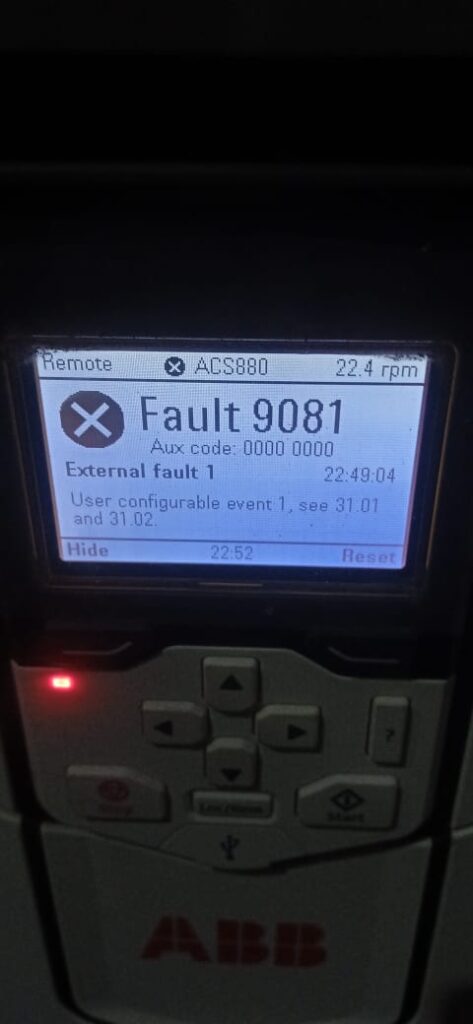
The ABB ACS880 drive is designed to be the “heart” of your machine, but it often needs to listen to the “brain” (the PLC) or the “eyes” (the safety sensors) of the rest of your system. If your drive trips with Fault 9081 (External Fault 1), it means an external device has sent a signal to the drive telling it: “Stop immediately, something is wrong with the system.”
Unlike internal drive faults (like overcurrent or overvoltage), an External Fault is a “request” from your machine’s safety or control logic. Here is how to track down which device is sending that stop command.
What Triggers Fault 9081?
The ACS880 allows you to configure specific digital inputs or communication bits as “External Events.” When that event is triggered, the drive stops to protect the process. Common sources include:
- Safety Interlocks: A tripped pressure switch, flow sensor, or temperature alarm.
- PLC “Health” Check: The PLC has detected a machine fault and instructed the drive to shut down for safety.
- Emergency Stop Loops: Hardwired emergency stops or safety gate switches integrated into the drive’s control scheme.
- System Monitoring: A “watchdog” signal that must remain active while the drive is running.
Step-by-Step Troubleshooting Guide
1. Locate the Signal Source (Parameters 31.01 & 31.02)
The most important step is figuring out which input is causing the trip.
- Navigate to Parameters > Complete List > Group 31 Fault Functions.
- Check Parameter 31.01 (EXT EVENT 1 SOURCE). This will tell you exactly which Digital Input (e.g., DI1, DI2, DI3) or Communication bit is being monitored.
- Check Parameter 31.02 (EXT EVENT 1 TYPE). This determines whether the drive treats this signal as a Fault (stops the drive) or a Warning (keeps it running).
2. Trace the Hardware
Once you know the source (e.g., Parameter 31.01 is set to DI2):
- Locate the physical terminal DI2 on the drive’s control board.
- Check the wiring connected to that terminal. Does it go to a relay, a switch, or a PLC output?
- Check the status of that external device. Is the relay currently open? Is the pressure switch tripped?
- Use your multimeter to check if there is 24V DC (or the expected signal level) at the terminal. If the drive is configured to trip when the input is low, a broken wire will cause an immediate fault.
3. Check PLC/Fieldbus Logic
If Parameter 31.01 is set to a communication source (like DI_BIT_1 or similar Fieldbus bits):
- Your PLC logic is sending the fault signal. Check your PLC program for any alarms labeled “External Fault” or “Drive Stop Request.”
- The fault might not be in the drive; the drive is simply obeying your PLC’s command to shut down.
How to Reset Fault 9081
Because this fault is external, you cannot just press the [Reset] button and expect the drive to stay running:
- Fix the external problem: You must clear the alarm on the machine itself (e.g., reset the pressure switch or fix the PLC fault).
- Clear the fault: Press the [Reset] button on the ACS880 keypad.
- Verify: If you reset the drive while the external signal is still “Active,” the drive will immediately trip again. Always resolve the external device first.