Facing Fault 7122 on your ABB ACS580? This guide explains the difference between motor stall and overload, how to check your parameters, and how to fix mechanical jams.
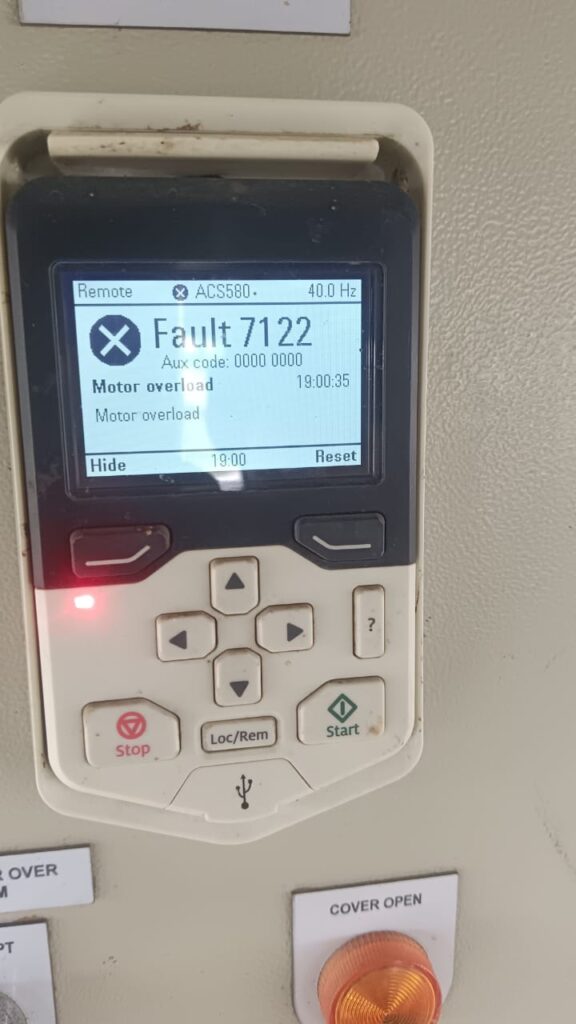
If your ABB ACS580 drive has ground to a halt and the control panel is flashing Fault 7122, your motor is essentially stuck. While many technicians call this a “motor overload,” the drive officially identifies it as a Motor Stall.
This is a critical protection feature. It means the drive is pushing as much current as it can into the motor, but the motor isn’t spinning fast enough (or at all) to meet the demand. To prevent the motor windings from overheating and melting, the drive trips 7122. Let’s look at how to find the “clog” in your system.
Why is Fault 7122 Happening?
When an ACS580 trips on 7122, it’s usually because the mechanical load is winning the “tug-of-war” against the motor. Common causes include:
- Physical Obstruction: A conveyor is jammed, a pump is clogged, or a bearing has seized.
- Undersized Motor: The motor is too small for the weight or pressure it is being asked to move.
- Incorrect Motor Data: The Nominal Current or Torque settings in Group 99 are wrong, so the drive isn’t providing enough “juice.”
- Oversensitive Stall Parameters: The drive is programmed to be too “protective” for your specific application.
Step-by-Step Troubleshooting for 7122
1. The Mechanical “Snag” Check
Before you change any electronic settings, you must check the machine’s hardware.
- Power down and lock out the drive.
- Try to rotate the motor shaft or the machine by hand (if safe).
- If the machine is stiff or locked, you have a mechanical failure. No amount of parameter tweaking will fix a seized bearing or a jammed gearbox.
2. Verify Motor Nameplate Data (Group 99)
The drive uses the data you entered to calculate how much torque the motor can safely produce.
- Check Parameter 99.06 (Motor nominal current).
- Ensure it matches the FLA (Full Load Amps) on the motor plate. If this is set too low, the drive will “starve” the motor and cause a stall.
3. Review the Stall Settings (Group 31)
The ACS580 allows you to define what a “stall” looks like. If your process has a very heavy start (like a mixer full of product), you may need to adjust the sensitivity.
- Parameter 31.24 (Stall function): This determines if the drive trips (Fault) or just warns you.
- Parameter 31.25 (Stall current limit): This is the current threshold. If it’s set too low, the drive trips 7122 during a normal heavy load.
- Parameter 31.27 (Stall time): This is the “countdown” before the drive trips. If your machine just needs a few more seconds to get moving, try increasing this time (e.g., from 20s to 30s).
4. Check for Motor Phase Loss
If one of the three wires to the motor is loose, the motor will lose a massive amount of torque and stall immediately under load.
- Perform a “tug test” on terminals T1, T2, and T3.
- Ensure all connections are tight and there are no signs of arcing or heat damage.
How to Reset Fault 7122
- Clear any physical jams in the machine.
- Allow the motor to cool—a stall causes intense internal heat that can’t be cleared by the motor’s fan because it wasn’t spinning!
- Press the Reset button on the keypad.
- If the fault happens during the “ramp-up,” try increasing your Acceleration Time (Parameter 22.02) to give the motor more time to overcome inertia.
Summary
The ABB ACS580 7122 fault is a “Safety First” code. It’s the drive protecting your motor from a mechanical overload. Most of the time, it’s a jammed machine or a loose wire. By checking your Group 31 stall settings and Group 99 motor data, you can usually have your production line back up and running in minutes.