Staring at Fault 2330 on your ABB ACS880? This Earth Leakage guide explains why current is leaking to ground and how to troubleshoot your motor and cables.
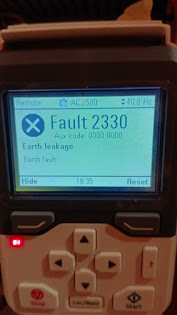
Solving ABB ACS880 Fault 2330: The Earth Leakage Troubleshooting Guide
If you are standing in front of an ABB ACS880 and the control panel is flashing Fault 2330, your drive is acting as a high-tech bodyguard. This code stands for Earth Leakage (also known as a ground fault).
In simple terms, the drive has noticed that some of the electricity it’s sending out to the motor isn’t coming back. It’s “leaking” into the ground. To prevent a fire, motor damage, or an electrical shock hazard, the drive trips instantly. Let’s walk through the steps to find the leak and get your production back online.
Common Causes of Fault 2330 on the ACS880
When an ACS880 trips on 2330, it is usually due to a physical issue in the field rather than a software glitch. Here are the usual suspects:
- Motor Insulation Breakdown: The copper windings inside the motor have degraded and are touching the metal frame.
- Damaged Motor Cable: The cable has been nicked, crushed, or heat-damaged, allowing a phase to touch the conduit or cable tray.
- Moisture: Water, condensation, or cutting fluid has entered the motor terminal box.
- Capacitive Leakage: You have exceptionally long motor cables (over 100 meters) creating “ghost” leakage.
- Internal Hardware Failure: In rare cases, the drive’s internal current sensors or IGBTs have failed.
Step-by-Step Troubleshooting for 2330
1. The “Isolation” Test (The Fastest Fix)
We need to figure out if the problem is the drive or the motor.
- Power down and lock out the drive.
- Disconnect the motor wires from the drive terminals (U2, V2, W2).
- Power the drive back up and try to “Start” it at a low frequency.
- If 2330 still appears: The drive’s internal hardware is damaged. You may need a repair.
- If the drive runs fine without the motor: The VFD is healthy! The problem is 100% in your cables or the motor.
2. Inspect the Motor Terminal Box
If your machine is in a wash-down area or a humid plant, moisture is the #1 culprit.
- Open the terminal box on the motor. Look for moisture, charred wires, or “carbon tracking” (black dust).
- Clean and dry the box thoroughly. Often, drying a damp terminal block is the only fix needed to clear a 2330 fault.
3. The Megger Test (Insulation Check)
If the motor box is dry, you need to test the internal health of the motor windings.
Crucial Warning: Never use a Megger (Insulation Tester) while the wires are still connected to the drive! The high-voltage test signal will destroy the VFD’s internal transistors instantly.
- Disconnect the motor leads from the drive end.
- Check the resistance between each phase (U, V, W) and the ground.
- A healthy motor should read several hundred Megohms. If it’s near zero, you have a dead short to ground.
4. Adjust Parameter 31.20 (Earth Fault Protection)
If you have very long cables and you’ve confirmed the motor is healthy with a Megger, you might be dealing with Capacitive Leakage.
- Navigate to Parameter 31.20 (Earth fault).
- You can try changing the setting to [0] No action or [2] Warning to see if the machine can run.
- Pro Tip: Only do this if you are absolutely sure the motor is healthy. Disabling this on a real ground fault is a major fire hazard.
How to Reset Fault 2330
- Identify and fix the short circuit in the motor or cable.
- Ensure the motor terminal box is completely dry.
- Press the Reset button on the keypad.
- If the fault was caused by a massive surge, you may need to cycle the main power (Off/On) to clear the internal hardware latch.
Summary
The ABB ACS880 2330 fault is a vital protector. Usually, it’s a motor winding failure or moisture in the terminal box. Start with the Isolation Test—it will tell you within 5 minutes if you need an electrician to fix a motor or a technician to repair the drive.