Getting Siemens G120 Fault F07950? Learn how to decode fault value r0949 to identify which motor parameter is wrong and how to correctly configure your SINAMICS drive.
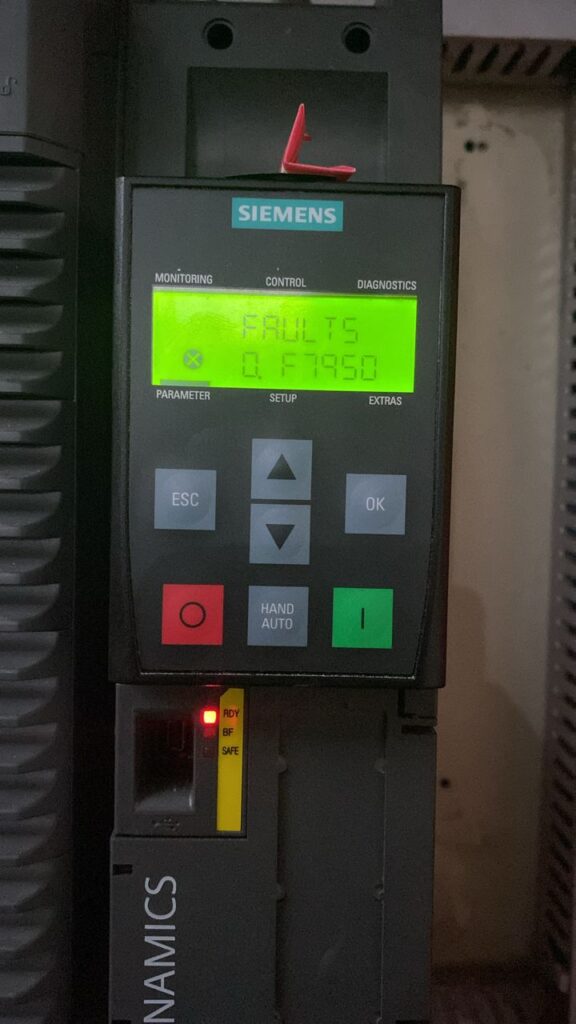
If you are in the middle of commissioning a Siemens SINAMICS G120 drive and the display suddenly trips with Fault F07950, don’t worry—your hardware is likely fine. This fault is the drive’s way of saying: “The motor data you gave me doesn’t make sense, or it’s incomplete.”
In the Siemens ecosystem, F07950 is a “consistency check” failure. The drive performs a mathematical verification of the motor nameplate data you entered. If the numbers contradict the laws of physics or if a critical field is left at zero, the drive will inhibit operation. Here is how to find the error and fix it.
The Secret Weapon: Decoding Fault Value r0949
When F07950 appears, the drive doesn’t just leave you guessing. It provides a diagnostic value in parameter r0949. This value tells you exactly which parameter number is causing the conflict.
- Example: If r0949 = 304, the drive is telling you there is an issue with p0304 (Motor Rated Voltage).
- Example: If r0949 = 300, it means p0300 is set to 0 (No Motor), or the motor type is unsupported.
Common Causes of F07950
While any motor parameter can trigger this, the most frequent culprits include:
- p0300 (Motor Type): Often left at ‘0’ (No Motor) during manual configuration. It must be set to the correct type (e.g., 1 for Induction, 2 for Synchronous).
- Zero Values: Entering 0 for Rated Current (p0305), Rated Power (p0307), or Rated Speed (p0311).
- Mathematical Mismatch: Entering a Rated Speed (RPM) that is physically impossible for the entered Rated Frequency (Hz) and pole count.
- Rating Plate Typos: Mistyping the kW as HP or entering the maximum frequency instead of the base frequency.
Step-by-Step Resolution Guide
1. Check r0949 Immediately
Navigate to the fault history or the active fault screen and look for the Fault Value (r0949). Note the number. This is the specific parameter you need to investigate.
2. Verify the Nameplate Data (Group p03xx)
Grab a flashlight and look at the physical metal tag on the motor. Ensure the following parameters in the drive match the tag 100%:
- p0304: Rated Motor Voltage (V)
- p0305: Rated Motor Current (A)
- p0307: Rated Motor Power (kW or HP)
- p0310: Rated Motor Frequency (Hz)
- p0311: Rated Motor Speed (RPM)
3. Check for Star/Delta Connection Mismatches
A common mistake is entering the “Star” (Y) voltage while the motor is physically wired for “Delta” (Δ). Ensure the voltage in p0304 matches the physical jumper configuration inside the motor terminal box.
4. Perform a Re-calculation
If you have corrected the values but the fault persists, set p0340 = 1. This tells the Control Unit to re-calculate the internal motor parameters based on the new data you provided. Often, this “refresh” is required to clear the F07950 consistency error.
Quick Checklist for F07950
| Parameter | Check Requirement |
|---|---|
| p0300 | Ensure it is NOT 0. Set to 1 (Induction) or 2 (Synchronous). |
| p0305 | Current must be > 0. Ensure it matches the motor FLA. |
| p0311 | Speed must include slip (e.g., 1450 RPM, not 1500 RPM). |
| p0340 | Set to 1 after changes to force a calculation. |
Summary Advice
Fault F07950 is simply the G120 protecting itself from “garbage” data. If you have checked your parameters and they match the nameplate, check your units. Ensure you haven’t swapped Power Factor for Efficiency or Amps for Volts. Once the math lines up, the fault will clear, and you can proceed to the Motor ID run (p1900).